
Converting Files with Docling#
Docling converts files in many formats into a DoclingDocument. from_docling() creates a ContextGem document from it, for a file in one of the supported formats, e.g. PDF, DOCX, PPTX, XLSX or HTML, in which each paragraph keeps what plain text loses:
its place in the structure of the file, e.g. the headings of its section, or the column headers of its table row, which the models get together with the paragraph;
the pages it is on, which give the pages of the items that refer to it.
📦 Installation#
uv add "contextgem[docling]"
Or using pip:
pip install -U "contextgem[docling]"
The docling extra installs Docling and PyTorch, on which Docling runs its models, e.g. those that find the layout and the tables of a PDF file. On Linux, PyTorch comes with the CUDA libraries of NVIDIA by default; for a CPU-only PyTorch, see the installation guide of Docling. The extra does not install on an Intel Mac (see Installation). Some formats need more than the extra, e.g. LibreOffice for DOC, PPT, XLS and RTF files (see the supported formats).
Tip
A Docling document converted elsewhere, e.g. by a Docling Serve instance, or saved by Docling as JSON and loaded with DoclingDocument.load_from_json(), needs only the document model of Docling, not Docling itself: uv add contextgem docling-core.
🚀 Quick Start#
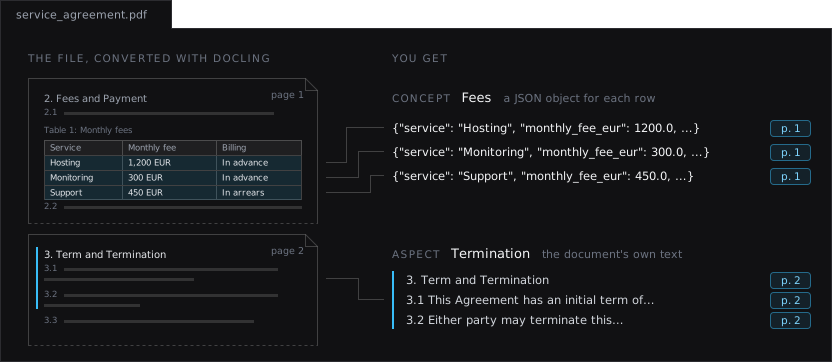
Convert the file with Docling, create the document with from_docling(), and extract from it as from any other document. Below, an LLM extracts a concept and an aspect from a two-page service agreement:
import os

from docling.document_converter import DocumentConverter

from contextgem import Aspect, Document, DocumentLLM, JsonObjectConcept


# Convert the file with Docling, e.g. PDF, DOCX, PPTX, XLSX or HTML
result = DocumentConverter().convert("service_agreement.pdf")
# The paragraphs keep their place in the structure of the file and their pages
doc = Document.from_docling(result.document)

doc.add_aspects(
    [
        Aspect(
            name="Termination",
            description="Clauses on the term of the agreement and its termination",
        )
    ]
)
doc.add_concepts(
    [
        JsonObjectConcept(
            name="Fees",
            description="The monthly fee of each service",
            structure={"service": str, "monthly_fee_eur": float, "billing": str},
            add_references=True,
        )
    ]
)

llm = DocumentLLM(
    model="openai/gpt-6-luna",  # or another LLM, cloud or local
    api_key=os.environ.get("CONTEXTGEM_OPENAI_API_KEY"),
)
doc = llm.extract_all(doc)

termination = doc.get_aspect_by_name("Termination")
# .extracted_items: 3 items, the heading of section 3 and clauses 3.1 and 3.2
# .reference_page_numbers: [2]

fees = doc.get_concept_by_name("Fees").extracted_items
# 3 items, one for each row of the table of fees. The first one:
# .value: {"service": "Hosting", "monthly_fee_eur": 1200.0,
#     "billing": "In advance"}
# .reference_paragraphs: the table row, with the header of each column:
#     "Service: Hosting; Monthly fee: 1,200 EUR; Billing: In advance"
# .reference_page_numbers: [1]
Each fee comes from a row of the table, which the LLM gets with the header of each column, and the termination clauses from section 3. reference_page_numbers gives the pages that an aspect or an extracted item was found on (see 📍 Pages and Positions).
The other arguments of from_docling() are passed to the document, e.g. aspects, concepts, sat_model_id or pre_segment_sentences (see Creating Documents). Its paragraphs and images are made from the Docling document, and its raw_text is the text of its paragraphs.
🧱 What the Document Is Made Of#
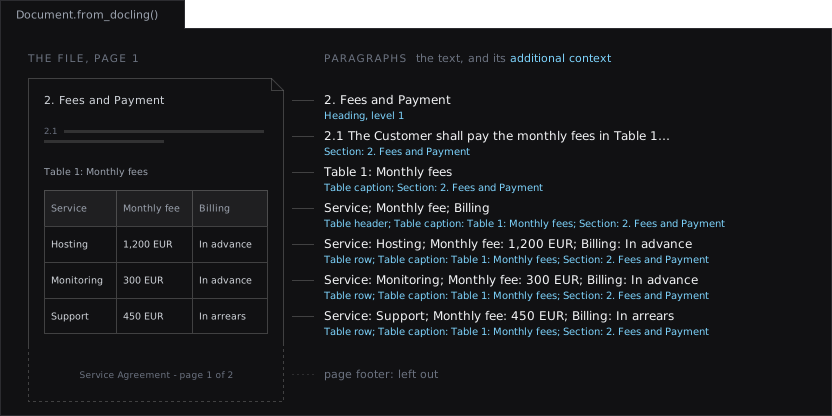
Each piece of text in the body of the file becomes a paragraph, in reading order. Its additional context says what the paragraph is, and where it is in the file:
In the file |
Paragraph |
Additional context |
|---|---|---|
Title, heading |
The text |
|
Body text |
The text |
Only the context below, e.g. its section |
List item |
The text, after the number of a numbered item, e.g. |
|
Table |
A paragraph with the headers of the columns, if the table has them, then a paragraph for each row, with each value after the header of its column, e.g. |
|
Caption, footnote, code, formula, checkbox |
The text |
e.g. |
Form field, key-value pair |
The key and the value, e.g. |
|
Cue of a subtitle file, segment of the transcript of an audio or a video file |
The text, with its start and end times in its custom data ( |
Only the context below, e.g. the speaker of a cue |
Where the file has them, the additional context also gives:
the headings of the section of the paragraph, e.g.
Section: 3. Term and Termination > 3.2 Notice;the sheet or the slide, in a spreadsheet or a presentation, e.g.
Sheet: Q3 figuresorSlide 2;the speaker of a cue, in a subtitle file, e.g. WebVTT:
Speaker: Ann Berg;the title, in a file with several titles, as the top level of the section, e.g.
List item; Slide 2; Section: Resultsfor a list item on a slide titled Results. Each slide of a presentation can have a title, and Docling makes a title of the heading of each chapter of an EPUB file and of each top-level heading (#) of a Markdown file. A file with one title has it in no section, as it would be in the context of every paragraph.
# ContextGem: Creating a Document from a File Converted with Docling

from docling.document_converter import DocumentConverter

from contextgem import Document


# Convert the file with Docling, e.g. a PDF, DOCX, PPTX, XLSX or HTML file
result = DocumentConverter().convert("path/to/service_agreement.pdf")

# Create a document from the Docling document
document = Document.from_docling(result.document)

# The additional context of each paragraph gives its place in the structure of
# the file, and is sent to the models together with the paragraph, e.g. when
# aspects are extracted. Its page numbers are the pages that its text is on.
for paragraph in document.paragraphs[5:10]:
    print(paragraph.page_numbers, paragraph.additional_context)
    print("   ", paragraph.raw_text)
# [1] Heading, level 1
#     2. Fees and Payment
# [1] Section: 2. Fees and Payment
#     2.1 The Customer shall pay the monthly fees in Table 1. The fees exclude VAT.
# [1] Table caption; Section: 2. Fees and Payment
#     Table 1: Monthly fees
# [1] Table header; Table caption: Table 1: Monthly fees; Section: 2. Fees and Payment
#     Service; Monthly fee; Billing
# [1] Table row; Table caption: Table 1: Monthly fees; Section: 2. Fees and Payment
#     Service: Hosting; Monthly fee: 1,200 EUR; Billing: In advance
The additional context is sent to the models together with the paragraph, in the requests that list paragraphs: to an LLM, for aspects and for concepts with references (add_references=True), and to a decision model, which reads each paragraph on its own, for aspects (see 🧩 Providing Additional Context for Paragraphs). A concept without references, which is how a decision model extracts concepts, is extracted from the text of the paragraphs only, and its items have no pages.
Left out: page headers and footers, comments, the speaker notes of a presentation, hidden slides and sheets, and the text that Docling finds inside pictures.
Sentences. A paragraph that is not running text, i.e. a title or a heading, a table header or row, a form field or a key-value pair, code, a formula, a checkbox or an entry of a list of references, is one sentence from the start: its whole text. A SaT model, which is made for running text, would split e.g. a table row within the text of a cell. The other paragraphs are split into sentences by a SaT model when sentences are needed, e.g. for an aspect with reference_depth="sentences", as in any document (see 🔌 Using SaT Models Without Network Access). A reference sentence of a table row is thus the whole row, with its pages.
Note
Headings of a PDF file have no levels. Docling detects the headings of a PDF file, but not their levels: each heading is at level 1, and the section of a paragraph is the heading before it. The headings of DOCX and HTML files keep their levels relative to each other, e.g. in HTML, Docling makes <h1> the title and <h2> a heading of level 1.
A scanned PDF file is converted the same way: Docling reads its text with OCR, and finds its structure with its layout and table models. Its paragraphs have pages too.
Tip
Docling can also export its document as Markdown, which can be passed to a document as raw_text. A document created with from_docling() differs in that its references hold no Markdown syntax, each table row keeps the headers of its table, and the page of each paragraph is known.
📍 Pages and Positions#
The page_numbers of a paragraph are the numbers of the pages that its text is on, e.g. [4, 5] for a paragraph that continues on the next page, and its sentences have them too. The reference_page_numbers of an aspect or an extracted item are the pages of its reference paragraphs and sentences, as in the example above.
Format |
Page numbers |
|---|---|
PDF, also scanned, images, Google Books packages, AFP print streams |
The pages |
PPTX, PPT, Keynote |
The slides |
XLSX, XLS, ODS, Numbers |
The sheets |
DocLang |
The pages that the DocLang document gives, e.g. of a document made from a PDF file |
HTML that Docling renders into pages ( |
The pages |
Audio and video |
Empty: each paragraph has its times instead ( |
The other formats, e.g. DOCX, DOC, RTF, ODT, ODP, Pages, HTML and Markdown |
Empty |
The page numbers are not sent to the models, and are kept when the document is serialized (see Serializing objects and results).
For more than the page, e.g. to highlight a paragraph in the file, the custom data of each paragraph holds, under the key "docling", where the paragraph comes from:
Key |
Value |
|---|---|
|
The reference of the Docling item that the paragraph is made from, e.g. |
|
The label of that item, e.g. |
|
For each part of the item, the number of its page ( |
|
For a table row, the index of the row in the table, whose header rows count, e.g. |
|
For a paragraph of a subtitle file or of the transcript of an audio or a video file, a list with an entry for each cue or segment it comes from: its |
E.g. the custom data of the first row of the table of fees, with the coordinates rounded:
{
    "docling": {
        "self_ref": "#/tables/0",
        "label": "table",
        "prov": [
            {
                "page_no": 1,
                "bbox": {
                    "l": 62.3,
                    "t": 477.0,
                    "r": 439.9,
                    "b": 377.3,
                    "coord_origin": "BOTTOMLEFT",
                },
            }
        ],
        "row_index": 1,
    }
}
🖼️ Pictures#
The pictures that the Docling document has image data for are attached to the document as images, e.g. for extraction with a vision model (see 🖼️ Concept Extraction from Document (vision)). A picture that repeats an earlier one, e.g. a logo on each page, is attached once. The custom data of each image holds the same Docling data as that of a paragraph, and the captions of a picture are paragraphs.
Whether the Docling document has image data for a picture depends on how the file was converted:
Source |
Image data |
|---|---|
DOCX, PPTX or XLSX file, a file that Docling converts into one of these (DOC, PPT, XLS, RTF), or an OpenDocument file |
Kept by default: the pictures are embedded in the file |
PDF file |
Kept with |
HTML or Markdown file |
Read with |
MHTML file |
Read with |
DocLang archive (DCLX) |
Kept by default: the images are in the archive, which docling-core extracts into a folder next to it ( |
Image file |
The image of each page, kept with |
Video file |
The frames that Docling samples, one every 10 seconds by default, each with its time in its custom data: kept by default |
Docling document saved as JSON with its images in separate files ( |
Read from the files only for a Docling document from a trusted source, which docling-core leaves to the calling code: |
Image at a remote URL in the Docling document |
Not fetched |
from docling.datamodel.base_models import InputFormat
from docling.datamodel.pipeline_options import PdfPipelineOptions
from docling.document_converter import DocumentConverter, PdfFormatOption

pipeline_options = PdfPipelineOptions(generate_picture_images=True)
converter = DocumentConverter(
    format_options={
        InputFormat.PDF: PdfFormatOption(pipeline_options=pipeline_options)
    }
)
The pictures that are not attached as images are counted, with the reason, in a message logged at the INFO level.
For an image file, e.g. a scan, the image of each page is attached too, before the pictures, so that a model reads the page itself, not only the text that Docling reads from it with OCR, e.g. for a concept of the "multimodal" modality, which an LLM extracts from the text and the images together. The custom data of the image of a page holds its reference ("#/pages/1"), the label "page" and the box of the whole page. The Docling document has these images with generate_page_images=True in the pipeline options of the image format of Docling, and images_scale sets their resolution, 72 DPI by default:
from docling.datamodel.base_models import InputFormat
from docling.datamodel.pipeline_options import PdfPipelineOptions
from docling.document_converter import DocumentConverter, ImageFormatOption

converter = DocumentConverter(
    format_options={
        InputFormat.IMAGE: ImageFormatOption(
            pipeline_options=PdfPipelineOptions(
                generate_page_images=True, images_scale=2.0
            )
        )
    }
)
The images of the pages of a PDF file, scanned or not, are not attached: with generate_page_images=True, Docling crops the pictures of the file from them, and the pictures are attached.
Note
A concept with the "image" or "multimodal" modality is extracted from all the images of the document in one request by default, and many providers accept only a limited number of images in a request. For a file with many pictures, pass max_images_to_analyze_per_call to the extraction method, below the limit of your provider, to send the images in parts, one request per part (see Dealing with Long Documents). Each request then sees only the images of its part.
📄 Supported Formats#
from_docling() supports the files in these formats. Its tests convert files in each of them with Docling, and check the paragraphs and the images of the document made of each. Some formats need more than the docling extra:
Format |
Extensions |
Needs |
|---|---|---|
PDF, also scanned, which Docling reads with OCR |
|
|
Images, e.g. scans, which Docling reads with OCR |
|
|
Word |
|
LibreOffice, for DOC |
PowerPoint |
|
LibreOffice, for PPT |
Excel |
|
LibreOffice, for XLS |
Rich Text Format |
|
LibreOffice |
OpenDocument text, spreadsheet and presentation |
|
|
Apple Pages, Numbers and Keynote |
|
|
HTML, and web pages saved in one file (MHTML) |
|
|
Markdown |
|
|
AsciiDoc |
|
|
LaTeX |
|
|
CSV |
|
|
WebVTT subtitles |
|
|
EPUB |
|
|
|
||
Box Notes |
|
|
JATS XML articles |
|
|
USPTO XML patents |
|
|
XBRL reports |
|
|
DocLang, the markup of Docling, as XML and as an archive |
|
|
Google Books packages (METS GBS) |
|
|
EBCDIC records of mainframes |
|
The layout of the records |
AFP print streams |
|
|
Audio, which Docling transcribes |
|
|
Video, whose speech Docling transcribes and whose frames it samples |
|
|
Docling JSON, which Docling saves its documents in |
|
Docling also takes other extensions of these formats, e.g. .adoc for AsciiDoc, .markdown for Markdown, .jpg for images, .wav for audio and .mov for video. What the formats in the last column need:
LibreOffice: Docling converts a DOC, XLS, PPT or RTF file into DOCX, XLSX or PPTX with LibreOffice, and then converts that. It finds LibreOffice on the
PATH, or in its folder on macOS. The installer for Windows does not add it to thePATH: add itsprogramfolder, e.g.C:\Program Files\LibreOffice\program, or setDOCLING_LIBREOFFICE_CMDto itssoffice.exe. On Debian or Ubuntu:sudo apt-get install libreoffice-writer libreoffice-calc libreoffice-impress.XBRL:
uv add "docling-slim[format-xml-xbrl]"installs Arelle, with which Docling reads a report. It reads the report with its taxonomy, from a folder that holds the schema and the linkbases that the report refers to, and only when it is allowed to read local files:from pathlib import Path from docling.datamodel.backend_options import XBRLBackendOptions from docling.datamodel.base_models import InputFormat from docling.document_converter import DocumentConverter, XBRLFormatOption converter = DocumentConverter( format_options={ InputFormat.XML_XBRL: XBRLFormatOption( backend_options=XBRLBackendOptions( taxonomy=Path("taxonomy"), enable_local_fetch=True ) ) } )
The facts of a report are key-value pairs, e.g.
TotalFees: value: 5850; period: 2026-07-01 - 2026-09-30; currency: EUR; decimals: 0, and its text blocks are text and tables.EBCDIC: Docling decodes the records with their layout, the
layout_fileofEbcdicBackendOptions, which it takes as thebackend_optionsofEbcdicFormatOption. The records are the rows of a table.Audio and video: Docling transcribes the speech with Whisper, which
uv add "docling[asr]"installs, and needs ffmpeg on thePATH. It uses the tiny model of Whisper by default, and a larger one hears better, e.g.asr_model_specs.WHISPER_SMALLas theasr_optionsofAsrPipelineOptionsfor audio, or ofVideoPipelineOptionsfor video.